FAQs
General questions about the portal HISinOne - Student Administration, Technical Problems, Privacy
Information about the portal HISinOne - Student Administration
The portal HISinOne - Student Administration is the campus management system of the Osnabrück University. It provides a comprehensive set of administrative functionalities for applicants, students, staff members and employees.
To access the HISinOne functions, please click on "Uni-Login" on www.hisinone.uni-osnabrueck.de and enter your university ID to log in. This is your user ID (aka username) and your password that you use to log in to most university services, e.g., Stud.IP and the university email account. It may also be referred to as an LDAP-ID or "Rechenzentrum ID." For more information, please visit the IT Services website.
The portal HISinOne - Student Administration is designed for use by primarily students, teachers, secretaries, and examination offices at Osnabrück University. The following is a general overview of the role-specific authorizations:
Students:
- register for exams
- view results
- retrieve certificates
Teachers (examiners)/secretaries (examiner representatives):
- View examination data
- Enter results
Examination offices:
- Access student data in the relevant department
- Create Transcript of Records
- Create examination dates
- Enter/edit achievements/results
- Create notifications
- Enter results
Should you require any further information regarding authorisations, please do not hesitate to contact hisinone@uni-osnabrueck.de.
Technical Problems
Technical issues can have a number of causes. Please verify that you are using the Uni-Login to register. For more information, please refer to the IT Services website.
Should the issue resurface upon subsequent attempts, we kindly request you to contact the HISinOne team for assistance with your particular case.
You can reach us via e-mail at hisinone@uni-osnabrueck.de
Further information can be found on the IT service pages.
Please note that university emails are sent exclusively to your UOS address (@uos.de, @uni-osnabrueck.de). Please check your mailbox regularly.
To change your role in the portal HISinOne - Student Administration, click on the "Change role" field in the top right corner of the webpage and select the role you require. If you only have one role, e.g., student, this field will not be displayed. If you have another role but it is not displayed, please contact the HISinOne team at hisinone@uni-osnabrueck.de.
In this instance, please direct your question to the appropriate examination office. The relevant contact information can be found on the HISinOne startpage.
The portal HISinOne - Student Administration utilizes cookies to optimize the user experience and to enhance the functionality of the system.
Please refer to your browser's privacy section to modify the cookie settings.
These settings can be tailored specifically for the HISinOne page, rather than applied universally across all internet pages. For further assistance, please consult your browser's help section.
Please note that some functions on the portal HISinOne - Student Administration open in a new window. Should you wish to use a function of this kind, you will need to enable pop-ups for the HISinOne website.
These settings can be tailored specifically for the HISinOne page, rather than applied universally across all internet pages. For further assistance, please consult your browser's help section.
Privacy and Data Security
The university has taken all the necessary technical and organizational measures to protect the personal data contained in the system from loss, destruction, manipulation, and unauthorized access.
Your HISinOne access is protected by the data center password, which you can change if you wish to do so. This means that only you have access to the desired, personalized HISinOne functionalities. To ensure continuing security, the password must be between eight and fourteen characters long and include a combination of letters, numbers, and special characters in both upper and lower case.
Additionally to these measures, your data is backed up daily, and it is encrypted.
For your own security, you must always end your login or session with the portal HISinOne - Student Administration by clicking on "Logout" to prevent unauthorized access to your personal data. Especially when using a public computer, such as in an Internet café, you must end your session by using the "Logout" button i.e. close all open browser windows.
For more information on data protection, see the data protection declaration.
The university is committed to protecting your personal data. Therefore access to the portal HISinOne - Student Administration is restricted to a select group of authorized users.
For example, only those individuals with the requisite authorization to process the data—including students themselves, responsible examiners, secretaries, and the associated examination office—can view the grades within the portal HISinOne - Student Administration. The examination offices of individual subjects/departments are only authorized to view the grades of those students who are enrolled in that subject.
For further information on data protection, please refer to the data protection declaration.
In accordance with the Federal Constitutional Court's principle of necessity, data protection legislation does not permit access to all student's performance data (see also § 3 p. 1 NDSG). Data processing must be limited to the necessary minimum , and it must be considered whether the tasks (in this case, counseling) can only be fulfilled with disproportionately great difficulty otherwise. However, students may choose to disclose their performance data themselves in counseling situations.
Questions for Students and Applicants
Application Management
Kindly do NOT use Hotmail, Outlook, or Live email addresses for registration. There have been instances in the past where sending emails to these providers from @uni-osnabrueck.de has not been reliable.
If you do not have another email address, please be sure to designate our domain, "uni-osnabrueck.de," as a trusted sender in your email account before completing the registration. You can do this by navigating to the settings of your email account and selecting "Inbox > Options > Junk E-Mail > Safe Senders."
If you do not receive an automatic email from our online portal within half an hour of completing this registration form, please contact us at hisinone@uni-osnabrueck.de.
Please carefully read all of the following information about how to log in as an applicant.
a) Email Verification
Upon completion of the initial registration process on our portal, you will receive a registration email containing your application ID and an activation code or verification link. It is important to complete this registration in a timely manner.
b) How can I register?
Please note that applicant registration is completed through the applicant login function (Bewerber-Login), not the university login (Uni-Login).
c. How can I find my application ID?
Please refer to the registration email for your application ID. Please note that the application ID is case-sensitive. It is not the same as your email address.
d) What is my password?
Should you have misplaced your password, you may retrieve a new one via the "Forgot applicant password?" function, located in the top right corner of the portal.
e) Is it possible to use login data from the previous semester?
Please be advised that your login details are only valid for the duration of one application semester and are deleted at the end of the registration period. If you have already applied for a past semester at the university, your login details from that time are invalid for the current application semester. You will therefore need to register again.
f) When I attempt to register again, the email validation process does not function as intended.
You have registered multiple times and have multiple application IDs. Only one registration is permitted for the current application semester. Any subsequent registrations will be rejected. The only valid application ID is the application ID of your initial registration for the specified application semester.
g) I am already enrolled as a student at Osnabrück University. What are the considerations I should be aware of?
If you are already enrolled as a student at Osnabrück University, you are not required to register. Please log in with your student ID via Uni-Login and proceed to submit your application under the menu item "Studies offered" - "Application".
The allocation of study places for the Bachelor's (B.Sc.) in Psychology and the First State Examination in Law (Staatsexamen) for the first semester is coordinated by the "Foundation for University Admission" (Stiftung für Hochschulzulassung) to help avoid unfilled study vacancies. Numerous pieces of information and FAQs regarding this allocation process are available on the website Hochschulstart.de.
If you are interested in starting your studies in the first semester of the Bachelor's (B.Sc.) in Psychology, your path to enrollment must begin with a registration through Hochschulstart. Personal data must be entered for the registration. After that, a BID (Applicant ID) and a BAN (Applicant Authentication Number) will be generated, which must then be submitted through the university's application portal. This means, conversely, that you can only submit your application through the University of Osnabrück's application portal after successfully registering on Hochschulstart.de. All necessary steps in the University of Osnabrück's application portal are explained there, and you will be guided securely and informatively through your application.
Further information can also be found on our websites for the Bachelor's (B.Sc.) in Psychology and the undergraduate program in First State Examination in Law (Staatsexamen).
Please refer to the application deadlines for your degree programme. Please note that you can only select the degree programme during the valid application period. Should you be unable to locate your degree programme despite the application period being open, please contact hisinone@uni-osnabrueck.de.
We kindly request that you verify your BID and BAN. Please note that you have selected a degree program that is managed via hochschulstart.de. In order for us to process your application, we require your BID and the corresponding BAN, which you receive upon registration with hochschulstart.de. If you have not yet registered, please do so at hochschulstart.de. If you have entered your BID and still receive the error message above, you may have another account for which you have already entered your BID. In this case, please contact hisinone@uni-osnabrueck.de so that this account can be activated and you can submit your application using it.
An application always comprises the selected degree program. Degree programs may be either single-subject, such as a Bachelor of Science in Computer Science, or Dual Major, such as a Bachelor of Education in German and Mathematics.
The application portal recognizes two distinct statuses:
Application status: The application status indicates the current status of an application.
Subject status: Subject status refers to the current status of a subject within an application.
During the application process, each application and the subjects it contains will progress through a series of statuses. Please refer to the portal for detailed explanations of these statuses.
Student Management
Upon enrollment, a student ID (user ID) was created for you. This ID can be accessed online after 24 hours via the IT service website. The information (your Student ID-No. and initial password) needed to access your new student ID can be found in your welcome letter. To access the letter, navigate to the portal HISinOne - Student Administration (Application/Student Portal) and click on "Student Services" followed by "Requested Reports / Reports – Welcome letter". Please note that you have 14 days from the date of enrollment to register with your previous application ID in the portal HISinOne - Student Administration.
To update your address in the portal HISinOne - Student Administration, navigate to the "Student Services" - "Contact data" function. This will display all of the contact data stored in the portal HISinOne - Student Administration. To add or modify data, simply click the pencil icon.
Please note that you cannot change information about your first and last names, date of birth, place of birth or birth name, gender or nationality yourself. Instead, please use the applications (forms) on the HISinOne homepage after registering as a student. You can use the "Student service" function in the portal HISinOne - Student Administration to display your personal data.
Each semester, you can create and print confirmations such as BaföG certificate (Federal Training Assistance Act) yourself using the "Student Services" function under "Requested Reports / Reports" in the "Common reports" section.
Additionally, you can access other certificates, including your certificate of enrollment, certificate of de-registration, and pension certificates. You can create notifications for all of your semesters, starting from summer 2017. Notifications that have not yet been read or printed can be displayed and printed using the print symbol. Subsequently, these notifications can be viewed as a copy at any time using the magnifying glass symbol.
The reports section allows users to generate a certificate of study progress for the last three semesters at any time. Once the semester has been selected, the user can then click on "Create PDF."
Please note that Safari should not be used for the download.
You can create and print certificates such as the certificate of de-registration yourself each semester using the "Student Service" function under "Requested Reports / Reports" in the "Common reports" section.
Additionally, you can access other certificates, including your certificate of enrollment and, if applicable, your pension certificate. You can create certificates for all of your semesters, starting from summer 2017. To view and print certificates that have not yet been read or printed, simply click on the print symbol. Once printed, these certificates can be viewed as a copy at any time by clicking on the magnifying glass symbol.
Please note that Safari should not be used for the download.
Please be advised that you can access your certificates via the portal HISinOne - Student Administration for approximately five years after de-registration.
To access information regarding previous payments and any outstanding semester fees, please refer to the "Student Services" function under "Payments." To re-register for the upcoming semester, transfer the calculated amount within the designated re-registration period. The bank details and purpose of the transfer will also be displayed at this time.
To obtain a detailed overview of the individual amounts comprising the invoice amount and any previously assigned payments, click on "Show details."
Should you have overpaid, you will find the available credit listed.
Furthermore, this function allows you to view payments made in previous semesters (up to 2017).
Please utilize the applications (forms) available on the HISinOne homepage after successfully logging in as a student.
Exam Registration and Deregistration
In the Stud.IP system, students can register for courses. In contrast, HISinOne facilitates registration for examinations. Please note that registering for a course in Stud.IP does not automatically link to an examination registration in HISinOne.
To register for an exam, please navigate to "My Studies" > "Exam Registration" > "Registration/Deregistration (own exams)" or "Registration/Deregistration (external examination)" in the tree structure. Once you have clicked on "Register," a page with important information about registering for the exam will be displayed. This includes the conditions for registering for the exam via the portal HISinOne - Student Administration. Please read these instructions carefully before proceeding with the registration.
The individual departments have varying approaches to handling the use of the portal HISinOne - Student Administration. If you are uncertain about whether you need to register for a module via the portal HISinOne - Student Administration or whether your subject requires registration for exams via the portal HISinOne - Student Administration, please contact your examinations office for guidance.
You can only register for the examinations that are offered by the subject for online registration.
In principle, registrations for regular study or examinations are possible via the portal HISinOne - Student Administration. However, this does not apply to individual final theses (e.g. bachelor's and master's theses), final oral examinations and other individual examinations.
To register for an exam in your degree program, navigate to "My Studies" > "Exam Registration and Deregistration" and select the "Registration/Deregistration (own exams)" function. Select the desired degree program and search for the relevant module in the examination regulations tree structure. Click "Register" next to the desired exam.
Pay close attention to the course title, the examiner's name, the examination date, the examination semester, and whether the achievement is for a course or an examination.
If these exams are part of your degree program, you can find them under "Registration/Deregistration (own exams)" on the "My Studies" tab. Please proceed to the degree program of the professional skills development area and register for the desired exam.
To register for an exam, please use the "Register/cancel registration (external examination)" function under the "My studies" tab. Please note that this function is only available for subjects that have released this .
Not necessarily. You will be provided with a comprehensive overview of the modules and exams that comprise your degree program. It is therefore recommended that you familiarize yourself with the examination regulations and the corresponding module descriptions, as these will assist you in determining which exams you must pass in order to fulfill the requirements for the completion of your studies. In particular, you will need to pay attention to the regulations concerning free electives and mandatory electives. You will find further details regarding the aforementioned regulations, as well as the relevant examination offices, on the university website titled " Examinations".
It is possible that an exam from your degree program will not appear in the portal HISinOne - Student Administration. The most common reason for this is that no online registration process will be carried out for this exam. In this case, please contact your examination office to find out about alternative registration procedures.
If you are not studying under current examination regulations, it may be that your exam is no longer offered.
If there's no registration button, it means there's no exam date or the exam office hasn't activated it.
Should the coursework credit you wish to register for not be listed, please contact the relevant examination office and/or the examiner.
In this instance, please contact the Examinations Office to ascertain which alternative examinations you are eligible to take.
Please be advised that exam registrations are only possible during the designated period. Outside of these deadlines, registration is not technically possible. In exceptional cases, registration outside of the deadlines is possible through the examination office only.
Please note that if prerequisites for exams have been set and these are not met at the time of registration, registration will also not be possible.
Additionally, registering for an exam in the context of another course will result in a registration block.
Should you encounter any further issues with exam registration, we kindly request that you review our FAQs. If you require further assistance, please contact the Examinations Office or the HISinOne support team without delay to ensure that you register within the deadline.
Please direct all inquiries to hisinone@uni-osnabrueck.de.
The Examination Office, in consultation with subject coordinators, establishes registration deadlines. To find a comprehensive list of examinations with corresponding deadlines, please click on the link "Examinations Offered." Should you have any inquiries, kindly direct them to the examiner or the Examination Office.
Please note that registration and deregistration deadlines are also visible when registering for the examination.
During the registration and withdrawal period, you can deregister or re-register online via the portal HISinOne - Student Administration at any time. This can be done via the menu item "My Studies" > "Exam Registration and Deregistration" > "Registration/Deregistration (own exams)". The function "Information about registered/deregistered exams" under "My Studies" > "Exam Registration and Deregistration" also contains a deregistration function. Online withdrawals are only possible before the end of the withdrawal period. Medical reasons via certificates and other valid withdrawals outside the withdrawal period must be submitted immediately to the relevant examination office.
You can find the exam number in the portal HISinOne - Student Administration under the link “Examinations offered” for the relevant degree program. You can also view exam numbers by going to “Studies offered” > “Show module descriptions”.
No, you can only register for one exam in the same semester and on the same date. If you wish to register for another exam under the same exam number (different course, examiner and/or exam type), you must first cancel your registration for the first exam and then register for the other exam. If you have any questions, please contact the appropriate examination office.
Please check whether one of these exams is also offered in another module context (e.g. elective area or specialization) and is listed there under a different exam number. If you have any further questions, please contact the relevant examination office.
This depends on the examination regulations. Contact your examination office for more information.
You will see a " Approved Examination" note on the module, along with the status (e.g., "passed exam").
During a semester of leave of absence, students may only register for exams if the reason for the leave of absence is to study abroad.
You can only register for next semester's exams if they are already offered online and you have already re-registered for the next semester.
If individual modules, examination, or study certificates can be included in different places in your curriculum, this is indicated by "Mulit-connected Elements". Once you've picked a spot, click on the green and red double arrow. You can register for the exam there.
The "Number" field refers to the examination number, not the course number.
Check Registrations and Deregistrations
Under "My Studies" > "Exam Registration and Deregistration" > "Information about registered/deregistered exams" you will find a list of all exams for which you have registered and have not yet been graded and those that you have deregistered. Check your registration to make sure you have registered by the deadline. You can print or save this information in PDF format in the "My achievements" or "Student services" section.
In addition, the corresponding exam is marked as "registered" or "deregistered" in the HISinOne function "Registration/Deregistration (own exams)" or "Registration/Deregistration (external exams)".
The exam may have already been graded. If there are any discrepancies, please contact your Examinations Office.
These are not listed for students, but are stored in the system log.
Achievements
Results can be found under "My Studies" > "Student Services" and under "My Studies" > "My Achievements". Results from the old system can be found under "My Studies" > "Old System (OPIuM)".
Notifications can be set up by navigating to "Service," then "Personal settings," and finally, "Email notification."
Once grades have been submitted, you will receive a notification at the university email address stored in the system. This address is stored by default.
To view this information, please navigate to "My Studies," then "Student Service," and finally "Contact Data."
Please be aware that no email notifications will be sent regarding the Examination Office's entries and corrections.
You may access your transcript of records in either German or English language as PDF file and print it out by navigating to the "My Studies" section and selecting the "Student Services" option. From there, you will need to click on the "Requested Reports / Reports" tab.
Additionally, this view includes various other certificates, such as the certificate of study progress and the BAföG certificate.
Furthermore, a PDF of your transcript of records can be created by navigating to the "My Studies" page, selecting the "My Achievements" section, and clicking on the "Leistungsübersicht (englische Variante)" link located at the bottom of the page.
The issue of a blank page arises when pop-up blockers are enabled via browser settings. It is therefore necessary to alter the relevant settings.
If you have changed your degree program (e.g., to a different version of the examination regulations), it is possible that previously completed courses are not yet displayed. In this case, the relevant courses must still be transferred by the respective Examinations Office. This is done automatically and you do not need to do anything.
Of course, the previous achievements are still available in the system. To see them, you have to check the box next to the previous semester in which you studied according to the "old" study regulations in the course of studies or "My Achievements" tab.
If this is not the case, please contact the respective examination office.
Questions for Staff Members and Employees
Guidelines
Guidelines can be found here (PDF, 1.87 MB).
Entering Results
You can only process the regular coursework and assessments for which you are authorized.
To do this, your exams (regular coursework or exams) must be released for processing in the portal HISinOne - Student Administration by the relevant examination office. These are usually the exams for which students can register online. Individual papers (e.g. Bachelor's and Master's theses), final oral examinations and other individual examinations are not processed via the portal HISinOne - Student Administration and can only be viewed under "Results Archive".
In the Grading function, all the students of all the scheduled exams associated with a course are grouped together in one list, and all the students of all the scheduled coursework associated with the same course are grouped together in another list. So if students can take either a scheduled coursework or a scheduled exam in a course, two lists will be displayed for you to enter results.
In order for these lists to be grouped correctly, all associated assessment dates for a course and for each assessment type (exam or regular coursework) within an assessment period must have the same date, time and examiner. This is true for assessment dates with any status, including "copied".
If there are any discrepancies, the red exclamation mark will appear. In this case, please contact the relevant examination office.
In this case, please contact the Examinations Office or the HISinOne team:
Email: hisinone@uni-osnabrueck.de
You cannot view your exams in the portal HISinOne - Student Administration until at least one student has registered.
The "My exams" function groups together all the students who will be examined in your course into a single list. This is regardless of the type of exam (presentation, written exam, term paper, etc.) or the module or examination regulation context in which the exam is taken. The second tab, "Grades", allows you to view the exams or coursework of individual students. Please also note that different types of assessment may occur in the "My Exams/Courses" function if different types of performance are assessed in your course.
"Grading" will separate students according to these criteria, and there may be lists of participants for different exams for a course. This function allows you to view all the exams assigned to the person (examiner/assistant examiner).
Once you have selected "My exams/events" from the "Achievements" menu, you can proceed to choose the relevant semester and, if necessary, apply a filter to view the specific exam in question. Should you wish to receive a list of participants, please click on the "View grades" or "Enter grades" button located next to the required examination. Should you require a list of participants and results in PDF format, please navigate to the "Choose order" section located at the top of the page. Please select " Teilnehmer- und Ergebnisliste". If you would like to receive a list of participants and results in Excel format, please navigate to "Excel Export" at the bottom of the screen. You can edit the Excel list and upload it to this list again. Please note that before the results are entered, this will be a list of participants only, and after this a list of results.
Yes, it includes all currently enrolled students, current withdrawals and, if available, assessments. The exception to this is students who have a hold in the system due to missing prerequisites for the exam.
If students cancel their registration online (only possible before the cancellation deadline), they will also disappear from the corresponding list. The same applies if the registration records are deleted by the Examinations Office. Registrations can only be made online by students or by the Examinations Office. If there are any discrepancies, please contact the Examinations Office.
Yes, you can. Download the list of participants as an Excel spreadsheet, then save and edit it. Scores can only be entered in the "Valuation" column. Columns may not be renamed, deleted, or swapped. Then upload this file to the appropriate exam/event. Once uploaded, the results from the Excel list will appear in the online form. The results must be confirmed by saving. Please note the feedback from the system in the "Annotation" column as you complete these steps.
If the results entry has already been completed, it is no longer possible to import, but it is still possible to export.
Grade entry is blocked for students who are registered as sick (by the Examinations Office). The Examinations Office can also block grade entry in special cases. If there are any discrepancies, please contact the Examinations Office.
It is not possible to enter credit points individually. For the exam, there should be a separate registration record for each possible number of credit points that can be earned. At the time of registration, students select the number of credits they wish to earn. In most cases, a distinction is made between course work and exam work.
If you wish to assign individual credit points when entering the results, please contact the Examinations Office.
The results are immediately visible in the student's performance overview.
If you have not yet finalized the list, you can change the grade at any time. To do this, enter the corrected grade or an “AN” (which stands for “result deletion”) in the grade field. Then click on “Save”.
When you click "Save", the assessment is stored in the database and is visible to all authorized editors from that point on; it appears immediately in the Student Performance Summary. Once the grades have been entered for all students, the list can be closed with "Close Input". It can no longer be edited online.
A closed list can be reactivated at the Examinations Office.
As a second examiner, you can enter and view grades for regular study and exam performance.
The "Written Work" tab appears under "Achievements" > "My Exams/Events".
The "Close Input" button is not active until all student grades have been entered and saved.
No, examiners and secretariat staff cannot change the results. If, for organizational reasons, a list needs to be reopened for editing, please contact the Examinations Office.
The actions available depend on whether the entries for an event have already been completed: the services for which the entry has already been completed can only be viewed. On the other hand, services that have not yet been completed can be edited.
Student Registration and Deregistration
The Examinations Office must check whether late registration is permitted and, if so, carry it out.
Examination offices can use the "Edit Achievements per Student" function to find information about various activities, including student exam registrations, on the "Functional Audit Log" tab.
The Examinations Office must check whether the withdrawal is legitimate and, if necessary, carry it out.
The relevant examination office can rebook a registration. Within the registration and cancellation deadlines, students can do this themselves online via the portal HISinOne - Student Administration.
Specific questions for Examination Offices
If you create a resit exam with a date in the next semester, the exam date is important for choosing the semester, not the semester of the original course.
Here's an example:
- The first course was in the summer.
- The resit exam is in October.
- Since October is already part of the winter semester, you must select the winter semester as the exam semester.
It is best to create these resit dates during the new semester with exam period 9.
At Osnabrueck University, the administrators of the examination offices are not supposed to organize and manage these groups, as the periods should be uniformly valid for the university. Therefore, the restricted function only makes sense for viewing the periods.
Grades can only be entered if students are registered for the exam.
Check whether the service you are looking for is an exam that is linked to a course or not. Go to "Course Organization" > "Exam Dates" and select "Create linked exam dates" or "Create exam dates".
In order to assign rooms to exams in "Course Organization" > "Exam Dates" > "Edit Exam Dates", the date and time of the exam must be set.
The information is entered in the "Exam Date" and "From - To" columns. In addition, the attendance and return dates must be entered using the appropriate action icons. Then save the information by clicking on "Save". The room assignment action icon will then become active.
The availability of the rooms has to be verified through organizational channels.
Under "Administration" > "Assign Examiner Representatives", you can assign substitute examiners to the respective examiners.
Contact the HISinOne team:
Email: hisinone@uni-osnabrueck.de
Interface and "Planungszuordnung"
An information exchange interface is built into the HISinOne and Stud.IP systems. This interface is designed to enable event-based exam registration and result entry. It is also a prerequisite for a module-based course catalog. The following videos explain how this interface works, what information is exchanged between the systems and what is important on the exam planning page ("Planungszuordnung").
The terms "module component" and "course group" (abbreviated LVG) are used interchangeably.
A course group combines courses that have the same characteristics. For example, if a seminar is to be taken as part of an examination or course requirement, all courses in which students can fulfill this requirement are combined in a course group. As a result, students only ever take one course within a course group.
All subjects use the data transfer between the portal HISinOne - Student Administration and Stud.IP.
"Planungszuordnung" is an optional feature of the interface, and it is up to subjects to decide whether to use it.
- When course offerings change from semester to semester
- When students can register for multiple exams through one course
- When another course can be taken as an alternative to completing the assignment
- To create a common list for entering grades per course
- When the course offerings are identical from semester to semester
- In clear cases where the exam and the course have the same name
- For real module exams
If there are some modules for which a subject uses the "Planungszuordnung" and some for which the subject does not use it, the technical handling via the interface is not a problem, but it can lead to more organizational effort. It can become confusing if different functions are used for the initial creation of appointment records for different modules.
If a course has e.g. different credit points when used in the Core curriculum for Teacher Education area opposed to when used in education science, there are no problems occurring because the information about the credit points is attached to the examination elements, i.e. to the course or examination, and not to the courses.
This makes it much more difficult to create exam dates. If possible errors are noticed before the start of the registration period, the assignments should be updated as soon as possible, if necessary in close coordination with the Campus Management Team. If errors are discovered during the registration period, the only option is to correct the registration process. After the registration period has ended, the Examinations Office must carry out manual corrections.
The responsibility should be clarified in the subject. Preferably, the program coordinator will assign the modules.
Courses should be created and assigned to module components no later than four weeks prior to the creation of exam dates.
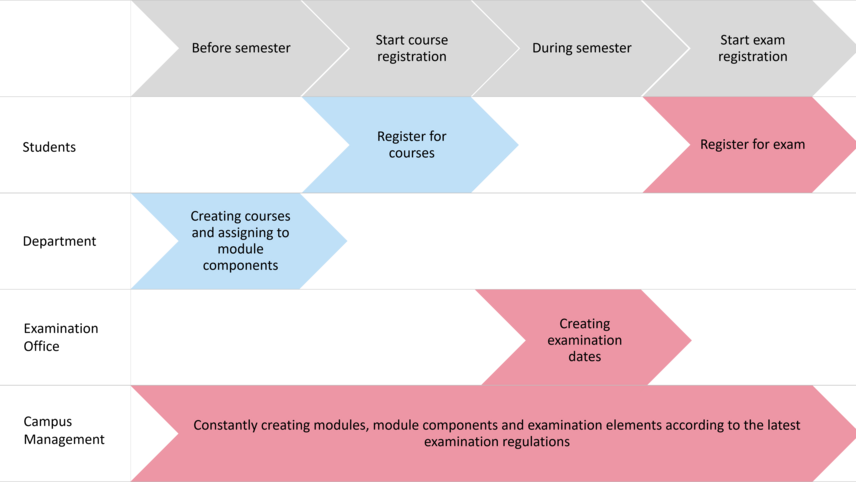
The work that needs to be done before and during the semester is shown in the overview on the left and described in detail in the "Planungszuordnung" video. Activities in Stud.IP are marked in blue, those in the portal HISinOne - Student Administration in red.
Before the semester starts, the different courses in the department are created in Stud.IP and assigned to the corresponding module components. After this students can register for the courses via Stud.IP.
Once the course data has been transferred from Stud.IP to HISinOne, the Examinations Office can create and release the exam dates in the portal HISinOne - Student Administration so that students can register for the exams.
In Campus Management, modules, module components and examination elements are continuously created according to the latest examination regulations.

The virtUOS campus management team creates modules in the portal HISinOne - Student Administration with their associated examination elements and module components according to the applicable examination regulations. This information is then transferred from HISinOne to Stud.IP.
1. The data transfer from HISinOne to Stud.IP takes place every Monday (if a new module has been created, the assignment of courses in Stud.IP is possible from the following Tuesday onwards).
Now the modules with the module components are available in Stud.IP, so that the respective department can assign different courses to these module components. These courses are now transferred to HISinOne via the interface.
2. The data transfer from Stud.IP to HISinOne takes place daily for the current and the following semester.
Afterwards the corresponding examination dates can be created in the examination office.
If a person in Stud.IP is assigned the function "not authorized to examine here," this designation is not transferred to the portal HISinOne - Student Administration. The entries "not specified" and "authorized to examine here" have the same effect and result in the person being transferred.
Other organisational issues
The term "global registration period" denotes a specified timeframe within the academic semester during which students may register for examinations. Individual registration periods may be permitted within this framework, subject to institutional policy.
The global registration period for the summer semester is defined as the period between April 1st and September 30th.
The global registration period for the winter semester is from October 1 to March 31.
In the portal HISinOne - Student Administration, open registrations are no longer permitted by default. In the event that a repeat examination is conducted with insufficient time between the examination date and the registration deadline, the requisite correction period must be coordinated with the lead time required for the registration to be organized and conducted.
In the portal HISinOne - Student Administration, a second attempt at registration is only possible after the first attempt has been graded.
While registrations for examinations from other departments can be technically supported, the decision of whether and according to which criteria areas are restricted ultimately rests with the respective departments.
In the portal HISinOne - Student Administration, the examination is directly linked to the semester. This means that the date of the examination determines the examination semester. To illustrate, if an examination is taken in the summer semester, the summer semester is considered the examination semester, even if possible courses were already taken in the winter semester.
To send an email to participants of an examination, one may utilize the functions "Exams/Events of My Organization Unit" (only for examination offices), "My Exams/Events," and "Grading." To do so, one must first click on the list of participants for the examination.
In the subsequent table, the "Customize Table" option can be utilized to display additional columns, such as "Checkbox for sending e-mails" or "Degree programs." The "Checkbox for sending e-mails" column can be employed to specify the students to whom the e-mail should be dispatched. It should be noted that the settings of the aforementioned columns are retained.
The "Display filter" function may be employed to specify the status with which the services are to be displayed. The default status is "Registered."
To send an email, select the "Serial email to all participants" option from the "Execute orders" drop-down menu located above the table. This will open an extended mask, where the subject, reply address, and free text can be entered. The university logo will be added to the email below the text.
It should be noted that the email is always dispatched to the address of the computer center (RZ-Mail) stored in the system. In the "E-Mail" column (if displayed), the specified email address may differ from the address stored as RZ-Mail.
The entries made under "Subject," "Reply-to Address," and "Content" can be saved as an "order" for subsequent access.
To accomplish this, it is necessary to complete all the requisite entries, after which the "Create new task configuration" option, located above the input field, should be selected. The task should then be designated with a name and saved using the disk symbol.
Upon subsequent invocation of the function, the option "Serial e-mail to all participants" may be selected, after which the previously